How to Export WhatsApp Business Messages to CSV
Export WhatsApp Business messages to CSV and import them into Excel without changing sender numbers. Understand the seven columns and media references.
2 min read
On this page
Export WhatsApp Business messages to CSV when you need to sort or review a conversation in a spreadsheet. Memora Keep exports message rows from your local archive; the CSV contains media references, not the attachment files themselves.
What you need
- Memora Keep on Windows or macOS. It’s free.
- A readable Business archive. Use the Android Business backup guide if you still need to create one.
- Excel or another spreadsheet app.
1. Choose the conversation and period
Open Archives → WhatsApp and check the business number. Select the customer conversation and review the dates you need.
Clear any selected messages to use the whole-chat export dialog. Click Export, choose the chat and date range, then select CSV.
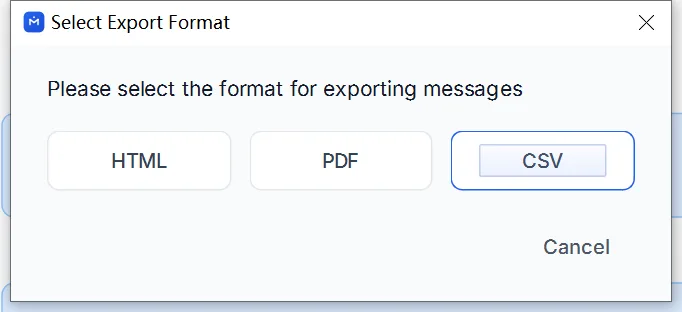
Save the file and check the export result for warnings.
2. Understand the columns
The CSV has seven columns:
| Column | What to check |
|---|---|
date | Message date and time. |
is_from_me | Whether the message was sent by the archived account. |
sender | The sender label available in the archive. |
text | Message text. |
media | Media information for the message. |
media_available | Recorded media availability. |
media_path | The recorded file path, when present. |
A path is not an attachment. For a portable copy with files, also export HTML + Media or PDF with its media package.
3. Import into Excel carefully
Use Data → From Text/CSV. Choose UTF-8 encoding and a comma delimiter. Before loading, set sender to Text, using the transform step if necessary, so number-like values keep their original form.
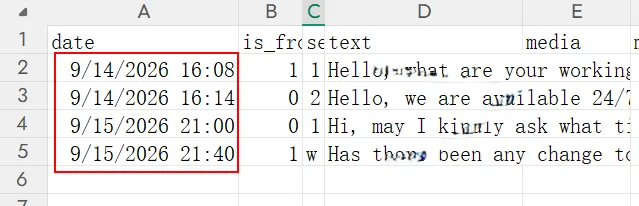
Compare several rows with the archive, including a long message and a sender shown as a phone number. If values changed during import, reopen the original CSV with the correct settings.
The table does not automatically classify orders, prices or customer labels. Review those details yourself before using them in a report.
- whatsapp business
- csv
- excel
- export