Backup Guides
How to Save iPhone Call Logs with Dates and Durations
Save iPhone call logs with dates and durations. Check the CSV against the archive and keep source details with your original export.
3 min read
On this page
A saved call list should tell you more than a number. You need to know when the call was recorded, what duration is shown and which backup the list came from.
Memora Keep can export call records from a readable iPhone backup to CSV. Check the values before sorting them or adding up durations in a spreadsheet.
What you need
-
Memora Keep on a Windows or macOS computer. It is free.
-
A local iPhone backup containing the data you want to read, and its password if it is encrypted.
-
Enough free disk space for the imported data and any files you export.
Start with a backup containing the calls
Choose a local backup from the correct device and period, then import it. If it is encrypted, enter the backup password.
Apple lists call history among the extra information that encrypted computer backups can contain. The backup still needs to contain the particular records you want.
Write down the device name and backup date. They help identify the source later, but the backup date is not the date of each call.
Export the records you need
Open Archives → Call History, select the records and click Export. Choose a folder and check the export result.
The call-history CSV guide covers the selection and export steps in detail.
Keep a short source note beside the file. The current CSV does not include a source-device column.
Compare the dates and durations
Open the CSV and compare several rows with the archive.
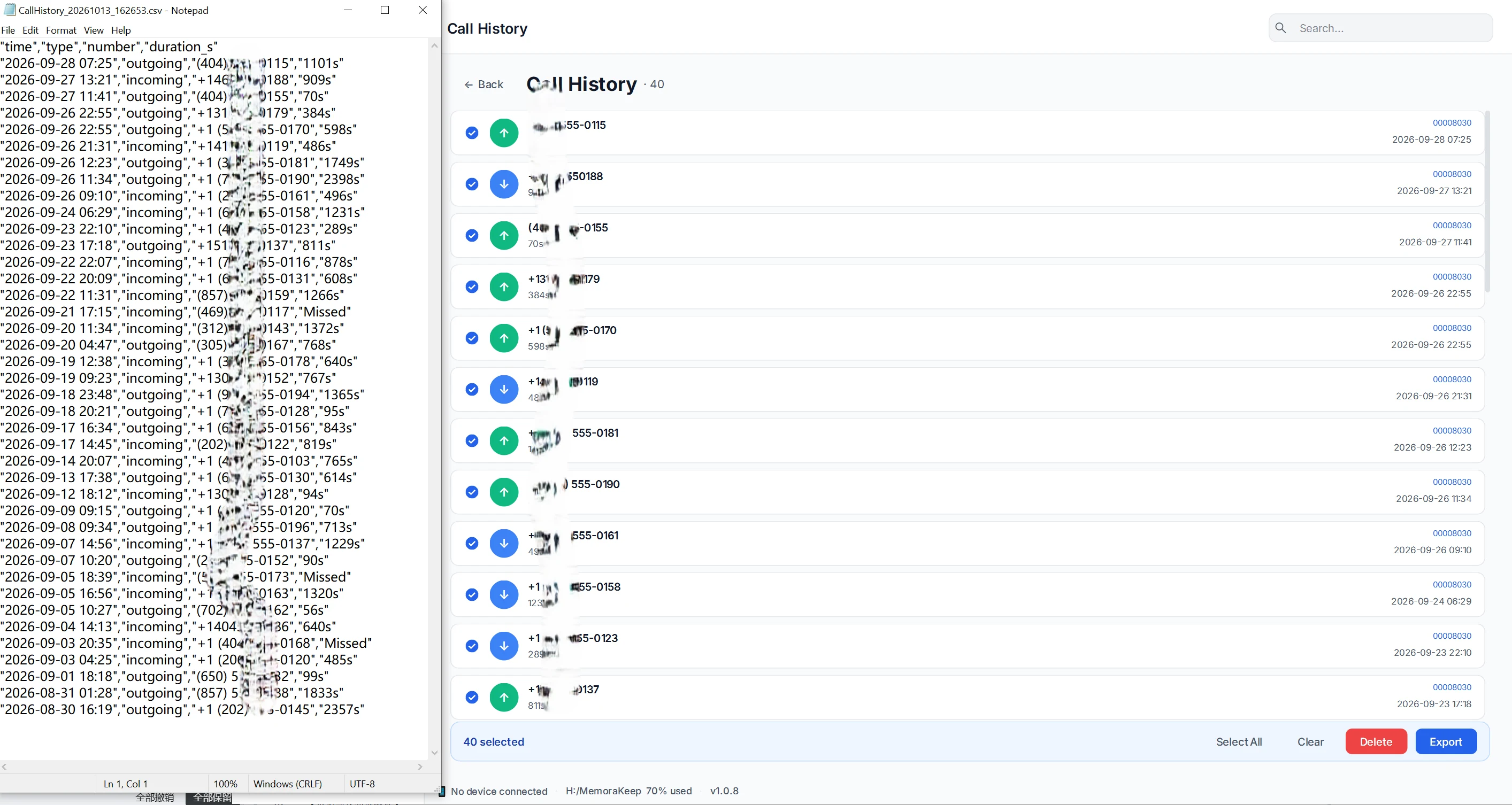
The file has four columns:
| Column | What to check |
|---|---|
time | The displayed call date and time |
type | The exported direction or call classification |
number | The recorded phone number |
duration_s | The duration text or label from the call list |
In the example, durations include values such as 1101s and 909s, while some entries contain Missed. Despite its name, duration_s is not always a plain number.
The time is a formatted display value. Do not assume that it includes a time zone or the full precision of the source timestamp.
Keep an original and a working copy
Save the first CSV unchanged. If you want totals, make a copy and keep the original duration text beside any numeric values you calculate.
For example, 1101s means 1,101 seconds, or 18 minutes and 21 seconds. A label such as Missed needs separate handling; do not silently turn every nonnumeric value into a zero-duration completed call.
Treat the number column as text when importing into a spreadsheet so formatting does not remove a plus sign or leading zero.
Read the list within its limits
A call log is not a recording or a carrier bill. A zero duration, missing label or unfamiliar classification does not by itself explain what happened during the call.
If a record is absent, check the selected backup and import result. A CSV can save the records available in the archive; it cannot fill gaps in the source.
For finding records in an older source, see viewing call logs in an old iPhone backup.
- iphone backup
- call history
- csv