WhatsApp PDF vs HTML Export: Which One Should You Pick?
Compare WhatsApp PDF and HTML exports for printing, reading, sharing and media. Choose the format that fits your needs with Memora Keep.
2 min read
On this page
Should you export your WhatsApp chat as PDF or HTML? The best choice depends on how you plan to use it.
Choose PDF for printing and sharing or HTML for reading and playing media in a browser.
Here’s how the two formats compare.
PDF vs HTML at a glance
| HTML | ||
|---|---|---|
| Printing | Fixed layout and page numbers | Browser printing, with less control |
| Photos | Shown in the chat | Shown in the chat, with access to the originals |
| Videos | Still frame with a link | Playable on the page |
| Searching text | Most readers support Ctrl+F | Browser search |
| Opening it | PDF reader | Browser |
| What you get | One file | ZIP containing an HTML page and a media folder |
| Sharing with others | Send one attachment | Send the page and media folder together |
| Best for | Printing, reports and submissions | Personal archives, reading and media |
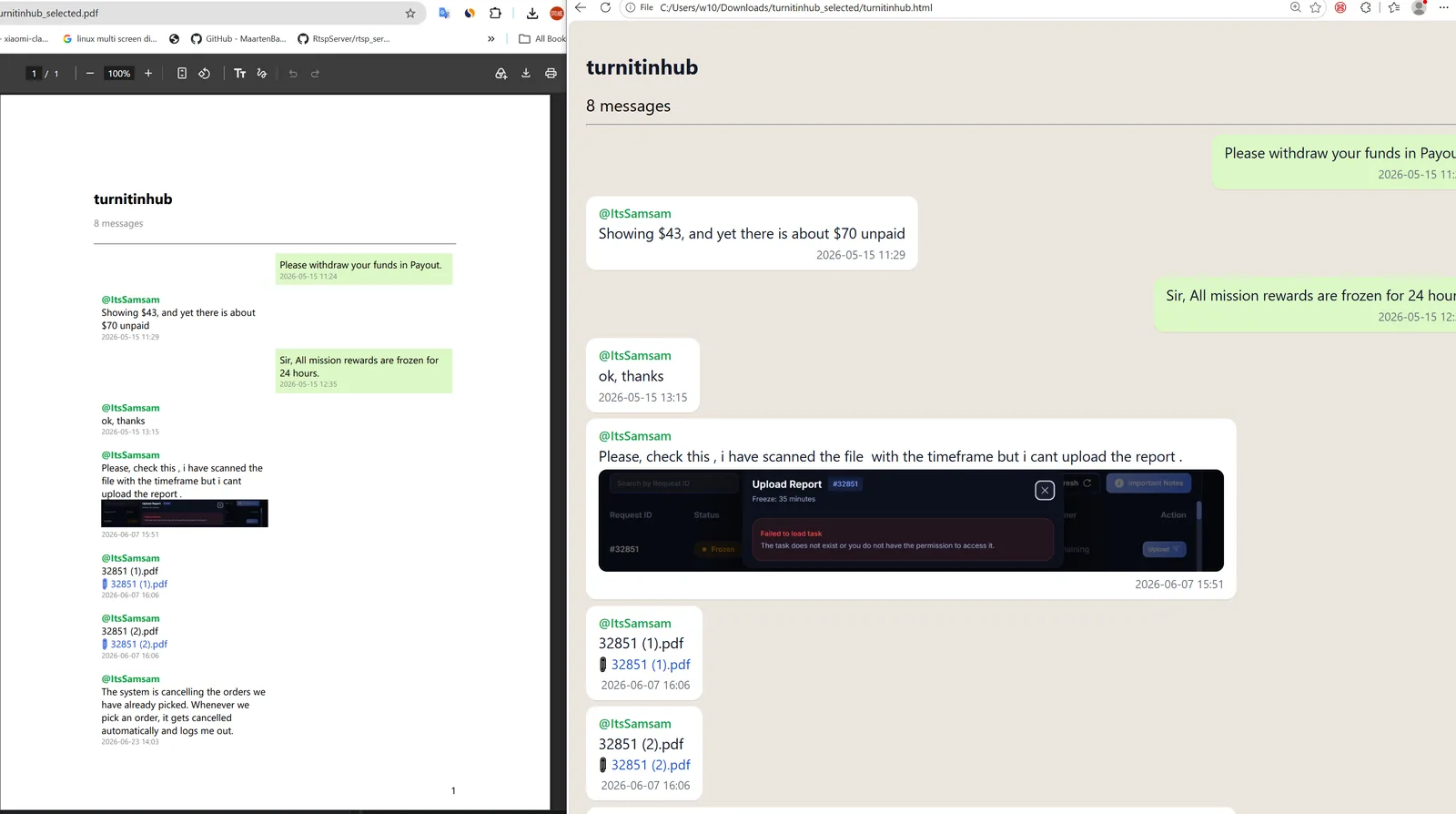
Choose PDF if…
- You need to print or submit the chat. PDF keeps a fixed layout with page numbers.
- You want it to be easy to open. The recipient can read it in a PDF reader without unpacking a folder.
- You want a single file. It’s easy to send by email or copy to a USB drive or cloud storage.
See how to export selected messages to PDF or a whole chat.
Choose HTML if…
- You want to read the chat later. HTML shows chat bubbles, sender names and timestamps, with playable videos.
- You want the original media. The ZIP includes original photos, videos and documents linked from the page.
- You want to search the conversation. Open it in a browser and use Ctrl+F.
See how to export a WhatsApp chat to HTML with media.
What about CSV?
CSV is useful for sorting, filtering and counting messages in a spreadsheet. If that’s what you need, see WhatsApp CSV vs TXT export.
Good to know
- Both formats are available in the same Memora Keep export dialog, so you can save a copy in each format.
- Both include sender names and timestamps.
- Both are created on your computer, with nothing uploaded.
- html
- export