Where Are WhatsApp Backups Stored on Android
Find common Android WhatsApp backup folders and understand Databases, Media and cloud backups. Paths and visibility vary by device.
2 min read
On this page
Android WhatsApp may store encrypted chat databases in a Databases folder and attachments in Media folders. These local files are separate from a Google account backup.
The exact paths and what your file manager can show depend on the device, Android version, WhatsApp version and permissions.
What you need
- The Android phone and a file manager, or access over USB.
- Space elsewhere if you plan to copy the files.
- For a readable computer archive: free Memora Keep on Windows or macOS.
Check common local locations
Look for these example paths for regular WhatsApp:
Android/media/com.whatsapp/WhatsApp/DatabasesWhatsApp/Databaseson devices using the older shared location.
A Media folder may sit alongside Databases, with subfolders for different attachment types.
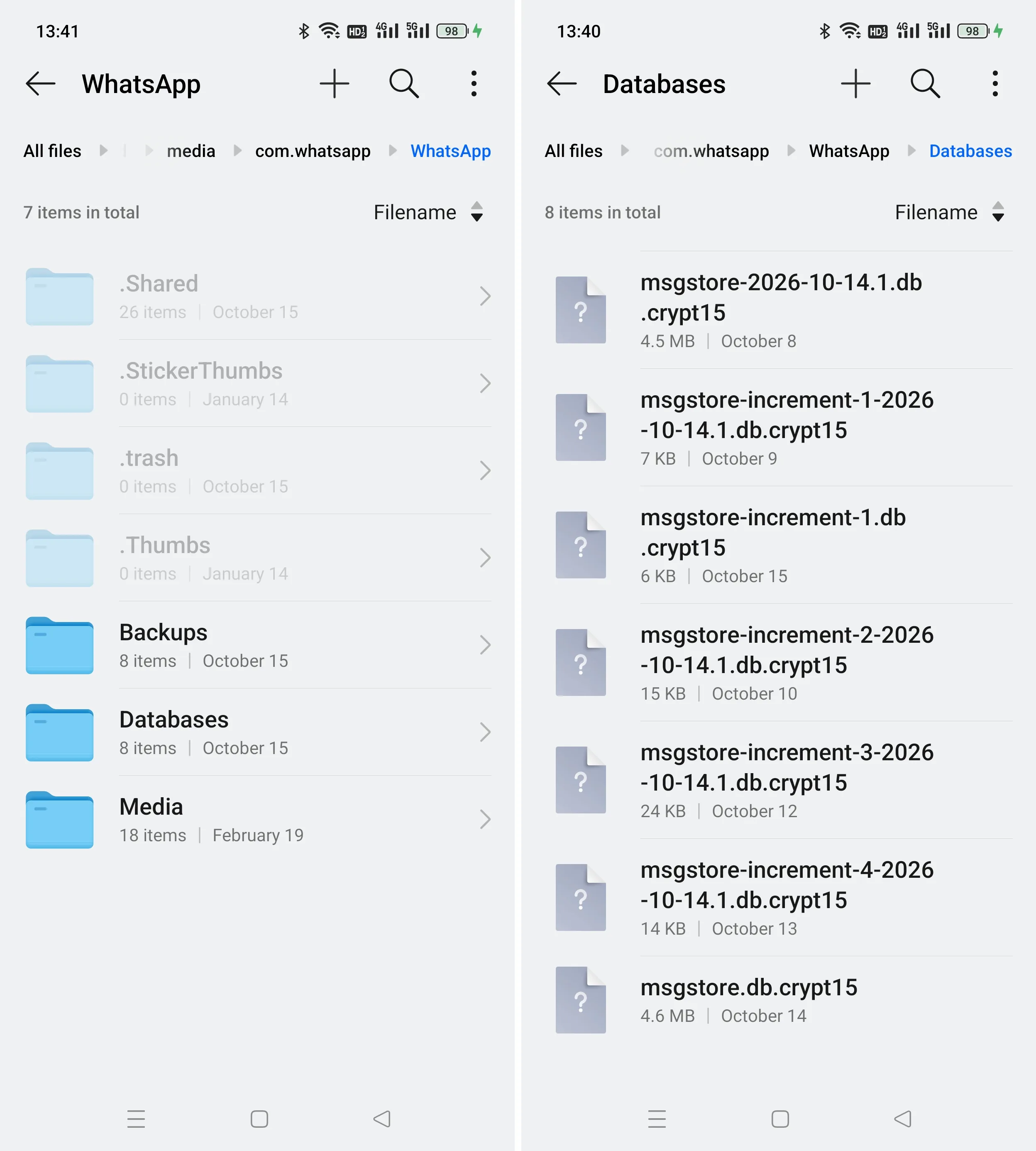
Treat these as places to check, not guaranteed paths. Business, cloned apps and work profiles may use different storage. If a folder is absent, check whether a backup was created, which app you use and what storage the file manager can access.
Understand the files
Names such as msgstore.db.crypt15 identify encrypted database files. The crypt suffix describes a format, not the age of the messages inside it. Older extensions do not by themselves prove that a file is a historical backup version.
Media files are separate. Copying only the database does not preserve every attachment; copying only Media does not preserve the conversation text.
Renaming a crypt file to TXT or DB does not decrypt it.
Keep cloud and local copies distinct
A Google account backup is not a folder you can browse in the phone’s file manager. Its use and recovery requirements follow WhatsApp’s Google account backup guidance.
Local backup files may also serve supported restore processes. Their purpose is not limited to computer archives.
Read saved chats on a computer
Use Memora Keep’s dedicated Android WhatsApp workflow with the phone connected. It handles the supported preparation and collection steps; it is not a general-purpose importer for any crypt file.
Follow backing up WhatsApp to a PC. Keep original files intact while investigating missing or unreadable data.
Frequently asked questions
Can I open a crypt file to read my chats? No. The crypt files are encrypted databases. They are not readable as text, and Memora Keep’s Android workflow collects from the phone rather than importing a single crypt file you found.
Why can’t my file manager show the WhatsApp folder? On recent Android versions, storage permissions limit what third-party file managers can see. Try the phone’s built-in file manager, and check the paths listed above; a missing folder view does not by itself mean no backup exists.
- android
- backup location
- crypt